
Everest is an open-source mod loader and modding API for Celeste, allowing you to create custom map packs, texture replacements and code mods to your heart's content.
Features
 We're too busy and don't have time to update this list.
It would also be longer if that Berry guy would've ignored us!
- In-game updater and dependency downloader
- Cross-platform: Windows, macOS, Linux
- Works with itch.io, Steam and Epic Games.
- Doesn't (and probably won't ever) work with the Windows Store.
- TASBot-verified
- Easily switch between Everest and vanilla Celeste from the title screen or Olympus
- Load mod files without messing with your original files:
- Custom sound effects
- New decals, tilesets, sprites and other graphics
- Custom character dialogues
- Completely new maps and campaigns
- And anything else thanks to code mods
- Sound test - including easter eggs hidden in Celeste by the legendary Kevin Regamey
- Quality of life improvements:
- Gets you out of most softlocks (disabled for vanilla maps)
- Discord Rich Presence - share your stats live
- Use your keyboard to rename save files
- Enhanced Debug Mode:
- Toggle the hidden debug mode in-game - no save file edits needed
- Live reloading of the map you're working on, both automatic and via F5
- Reload all code and assets quickly using CTRL + F5
- F6 to open the improved map viewer - now without losing progress and with SHIFT / CTRL modifiers!
- Got a keyboard without
~and want to open the console? Press. - Speaking of console: Live log output using the
--consolelaunch flag
- A lot of unhardcoded and customizable entities for your custom maps
- And much more that did not fit into this list. Whew!
Installing Everest
Olympus - Cross-platform Everest Installer
 YOLO! This fancy tech is actively worked on, so don't be surprised if it blows up in your face.
Please report all bugs to the Everest Team in #modding_help on the Celeste Discord server!
Feel free to scroll down to the manual installation instructions if this doesn't work.
-
If you are on Windows:
-
Download
olympus.exefrom GameBanana and run it. - If Windows SmartScreen blocks it, tell it to run anyway.
- If your antivirus blocks it, let them analyze it as a false positive and if possible, send them here.
Olympus can update itself and injects Everest code into Celeste.exe but both are open-source.
-
Download
-
If you are on macOS:
- Download the latest autobuild.
- Unzip the zip inside of the zip.
-
Drag the Olympus app into your Applications folder.
If you leave it in your Downloads folder, some things like self-updating might not work!
- Instructions for running the unverified app-
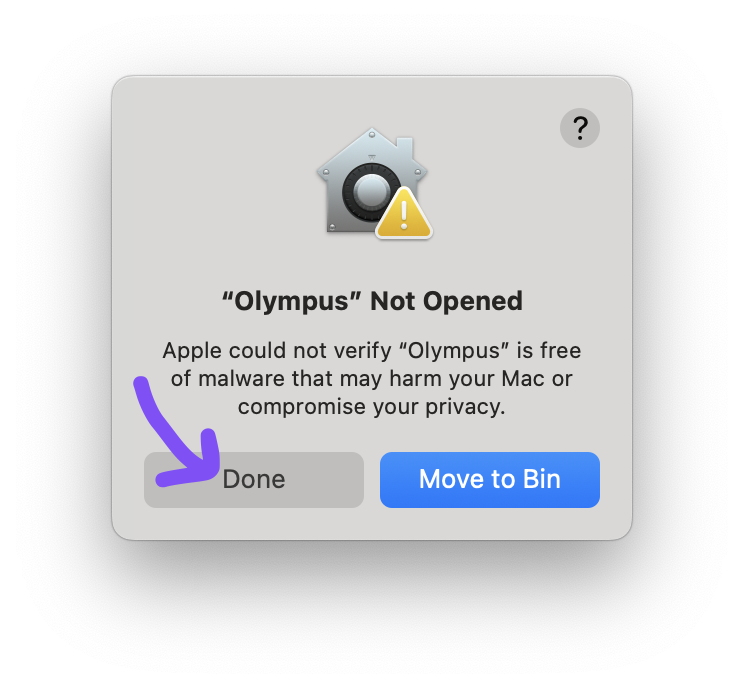
Running Olympus will probably result in this error showing up. Close it by clicking "Done".
-
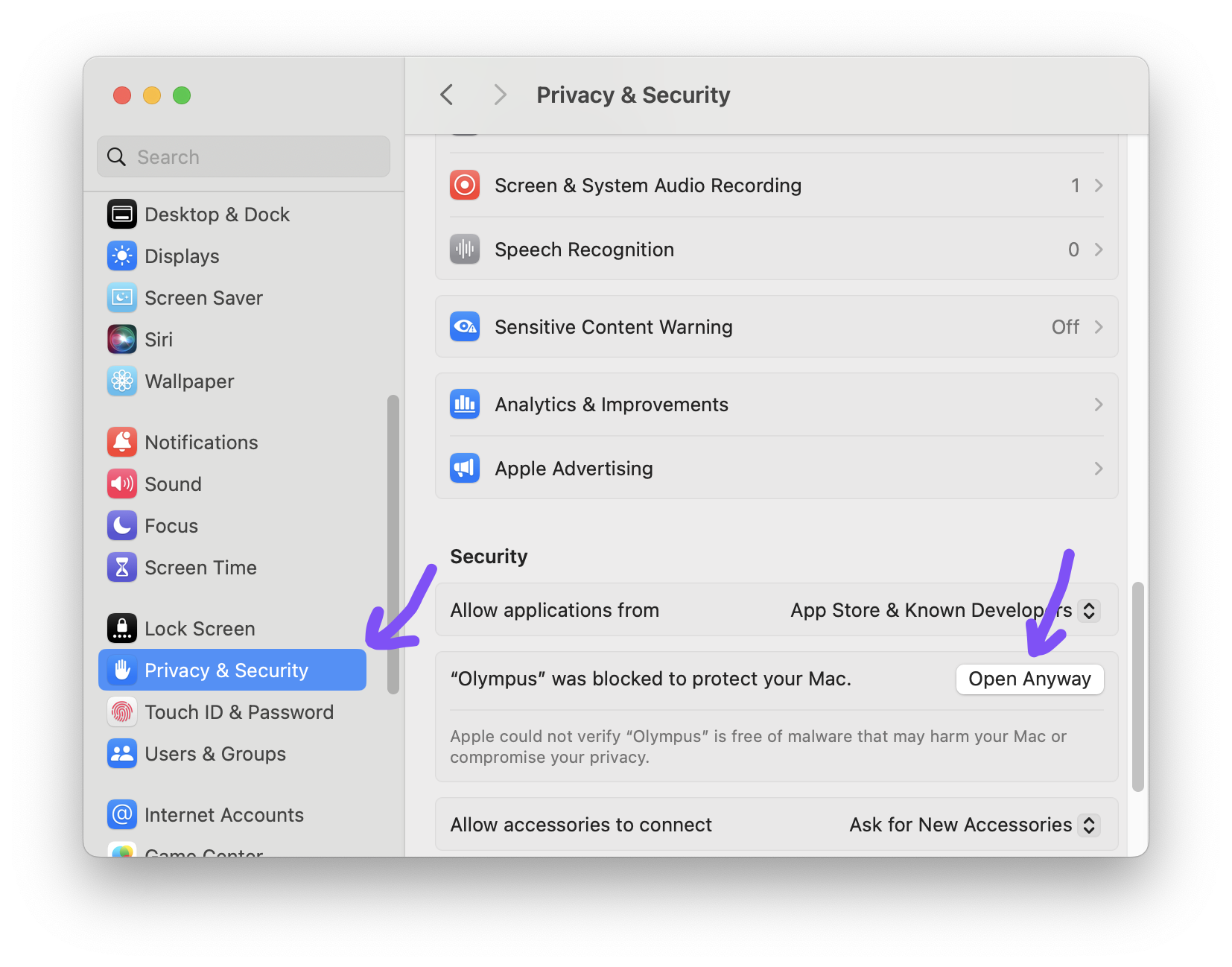
Then, open the Settings app, select "Privacy & Security" and scroll down until you see a notice about Olympus. Open it anyway!
-
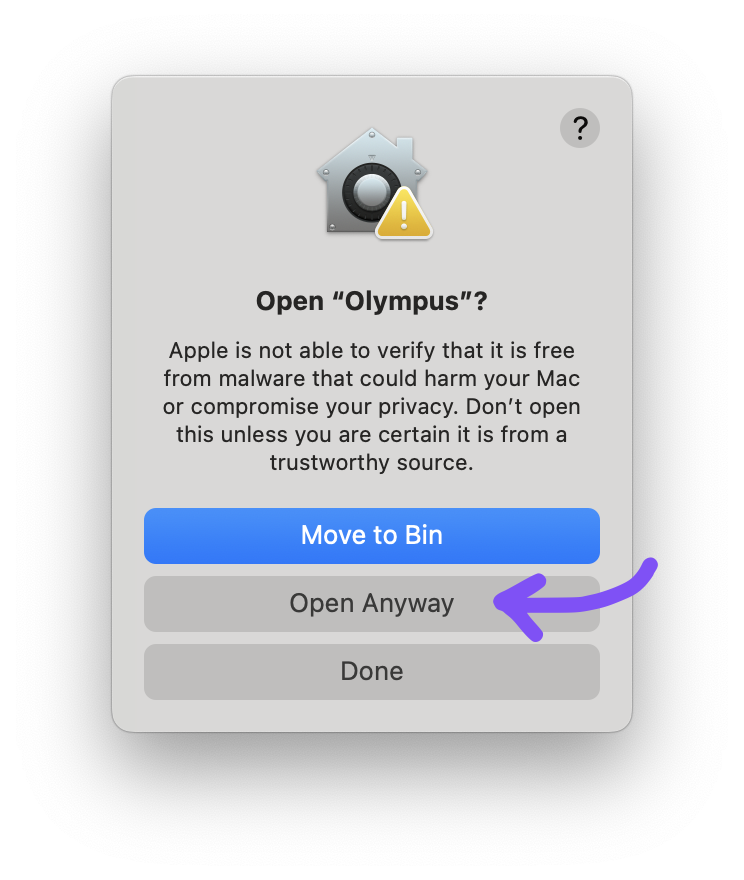
Go through this final warning by clicking "Open Anyway" again. You might need to type your password to finish the process.
-
Running Olympus will probably result in this error showing up. Close it by clicking "Done".
-
If you are on Linux:
- Download the latest autobuild.
- Unzip the zip inside of the zip.
The resulting folder will be your Olympus "installation" folder. - Run
install.shin a terminal to install the one-click installer handler and application icon. -
Run Olympus from your applications list (or
olympusin the folder) and hope that it works.
If it doesn't, here are some things to check:- You might need to install FUSE 2 for the bundled love2d to work. Check this page for instructions. Do not run
apt install fuse! - If the bundled love2d doesn't work and your distro provides it via the package manager, try that.
- If you are on Arch Linux, you can give the unofficial AUR package a try.
- Alternatively, you could also try out the Flathub package.
- You might need to install FUSE 2 for the bundled love2d to work. Check this page for instructions. Do not run
- No matter what platform you are on:
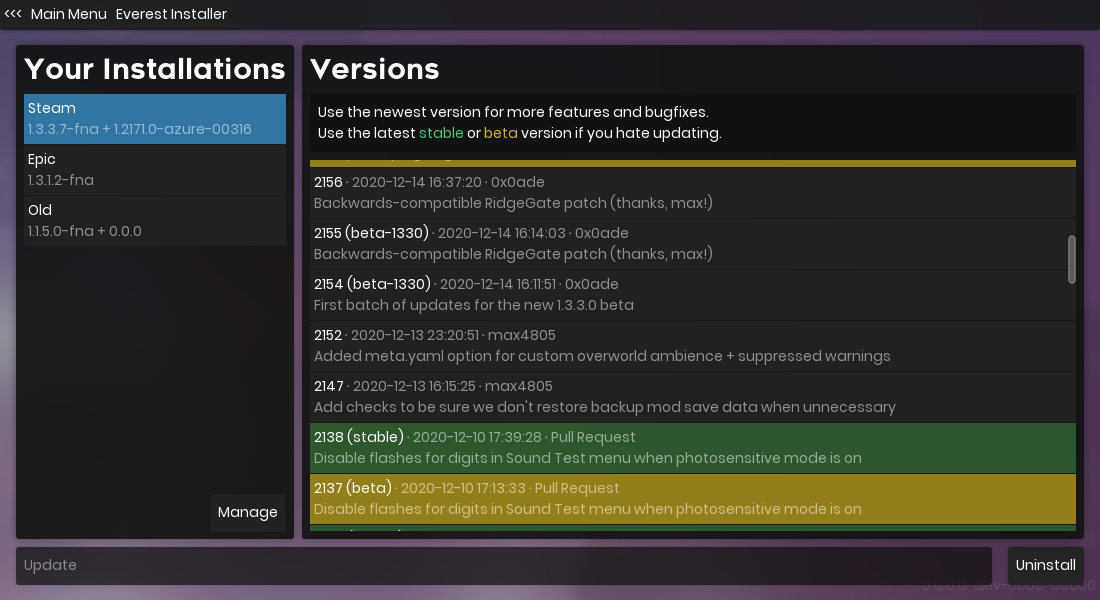
- If there's a red ! on the options button, update Olympus first.
- Press on the "Manage" button on the left side.
- Add your Celeste installation(s), change the name(s) as you see fit.
- Go back (top left corner) and press the huge Everest installation button.
- Select an Everest version and hit the long "Install" or "Update" button.
Everest.Installer for Windows (old)
- Download
everestinstaller.exeand run it. - If Windows SmartScreen blocks it, tell it to run anyway.
Cross-platform manual installation
 If you need to scroll down this far, please let us know why so we can improve Olympus.
As a last resort, you can follow the installation instructions below to install Everest manually!
-
Download the latest autobuild for the branch you want:
- stable branch: best if you don't need any new features and just want to play mods.
- beta branch: best to develop your mod or to have others test your mods on, with earlier access to new features.
- dev branch: gets updated very frequently as development of new features goes on.
- Open the directory where Celeste.exe is located:
- With Steam: right click Celeste in your library, then "Manage" > "Browse local files".
- On macOS: follow the step above if you own the game on Steam. Right click the Celeste application, and choose "Show Package Contents". After that, go into the
Contentsdirectory, thenResources.
- Open the
main.zipfile you downloaded, then copy the contents of themainfolder to the directory where Celeste.exe is:Celeste.Mod.mm.dllshould be right next toCeleste.exe. - Run the appropriate MiniInstaller executable for your operating system:
- On 64 bit Windows, run
MiniInstaller-win64.exe. - On 32 bit Windows, run
MiniInstaller-win.exe. - On Linux, run
MiniInstaller-linux. - On macOS, run
MiniInstaller-osx.
- On 64 bit Windows, run
Installing mods
- Find a mod that you want to play with on GameBanana, or in the "Download Mods" section of Olympus.
- Press the 1-click installation button.
- If the 1-click installer doesn't work, put the mod
.zipinto theModsdirectory where Celeste is, or drag the.zipon Olympus to install it. - For prototyping and development, feel free to use a folder instead of a
.zip
- If the 1-click installer doesn't work, put the mod
- That's it. No need to extract anything.
 by the Everest Team